Categories
Human-centered design

Quiet designers and fluid team boundaries

You can’t create a people-centered service on your own. In this blog, you’ll learn why it matters who you involve in the design of government services—and why that goes beyond just “a design team.” You’ll also discover what you’re missing if lawyers and administrators aren’t involved.

Want an update in your mailbox every month about my research? Then subscribe to my newsletter.

Stickers on the laptop

What perhaps surprises me most about the team I’m part of now is how different it feels from the design teams I’ve worked on before. Back then, I was surrounded by UX designers, researchers, content designers, and—okay, maybe the occasional business analyst. Everyone spoke the same language, used the same tools, and had the same stickers on their laptops. These were teams where we usually got along great—if only because we shared the frustration of not making more of an impact within our organization.

A year and a half ago, I began my field research for my doctoral dissertation with the Clustering Rijksincasso program. Here, I don’t find a traditional design team like the ones I’m used to. In fact, no one here calls themselves a designer. There is one colleague listed as a “researcher,” but who clearly also works as a UX designer. The rest are process coordinators, lawyers, analysts, project managers, and product owners—people who are very hands-on and “simply” building services.

Whenever I ask about people-centered design—or, to use the jargon, “human-centered design”—in interviews, I invariably get answers like:

“Yes, but once you realize that a citizen only has one repayment capacity, it makes perfect sense. So why not just do it that way?”

Starting from a simple idea, they challenge the internal structure of the government, create space for new ways of delivering services, and don’t get bogged down in fancy jargon. No one has stickers on their laptops. Yet I knew right from the start: this is a team that designs people-centered services.

What makes a good design team?

The ISO standard on human-centered design states that a design team must incorporate multidisciplinary skills and perspectives. A design team does not need to be large, as long as it is able to incorporate all relevant perspectives into the design so that it aligns well with the users, their context, and their needs.

One of the strengths of design-based work is that it not only gathers different perspectives but also brings them together. Design makes it possible to bring together interests that at first glance seem contradictory—such as simplicity versus precision or enforcement versus service—into a solution that works. It is precisely when you bring these perspectives together within your team that space is created to make better choices collectively. A good design team, therefore, is not a collection of experts, but a collective that can shift between perspectives.

The team’s boundaries

When we think of a team, we often picture a small group of people working together. A team can also consist of a structure with different layers and subteams, which in turn form a team together. For each team, you can pool your expertise and perspectives in a very focused way.

At CRI, this is reflected in how the program works with ad hoc teams focused on specific issues. For example, there is a “small group” working on the legal framework for data exchange so that the Tax and Customs Administration and the Benefits Service can connect to the Central Government Payment System (BRR). This team includes colleagues from all three organizations.

Another ad hoc team consists of colleagues from DUO to expand their participation in the BRR. Where there is overlap with issues that the Tax and Customs Administration and the Benefits Service also face, a call is scheduled to brainstorm how they are addressing them. All of these people are working together to build this payment service. Team boundaries are fluid.

In fact, there is a strong sense within the program that anyone who contributes to the service is part of “Team CRI,” whether they work at CJIB, the Tax and Customs Administration, UWV, or DUO.

Quiet Design

I’ve noticed that in this program, people from all kinds of fields and roles collaborate on the services they create, without calling themselves designers. They don’t work in a secluded lab, testing ground, or internal UX club, but right in the thick of things. Yet they are indeed designing human-centered services. In the literature, this is called “silent design”—designing without people actually calling it that.
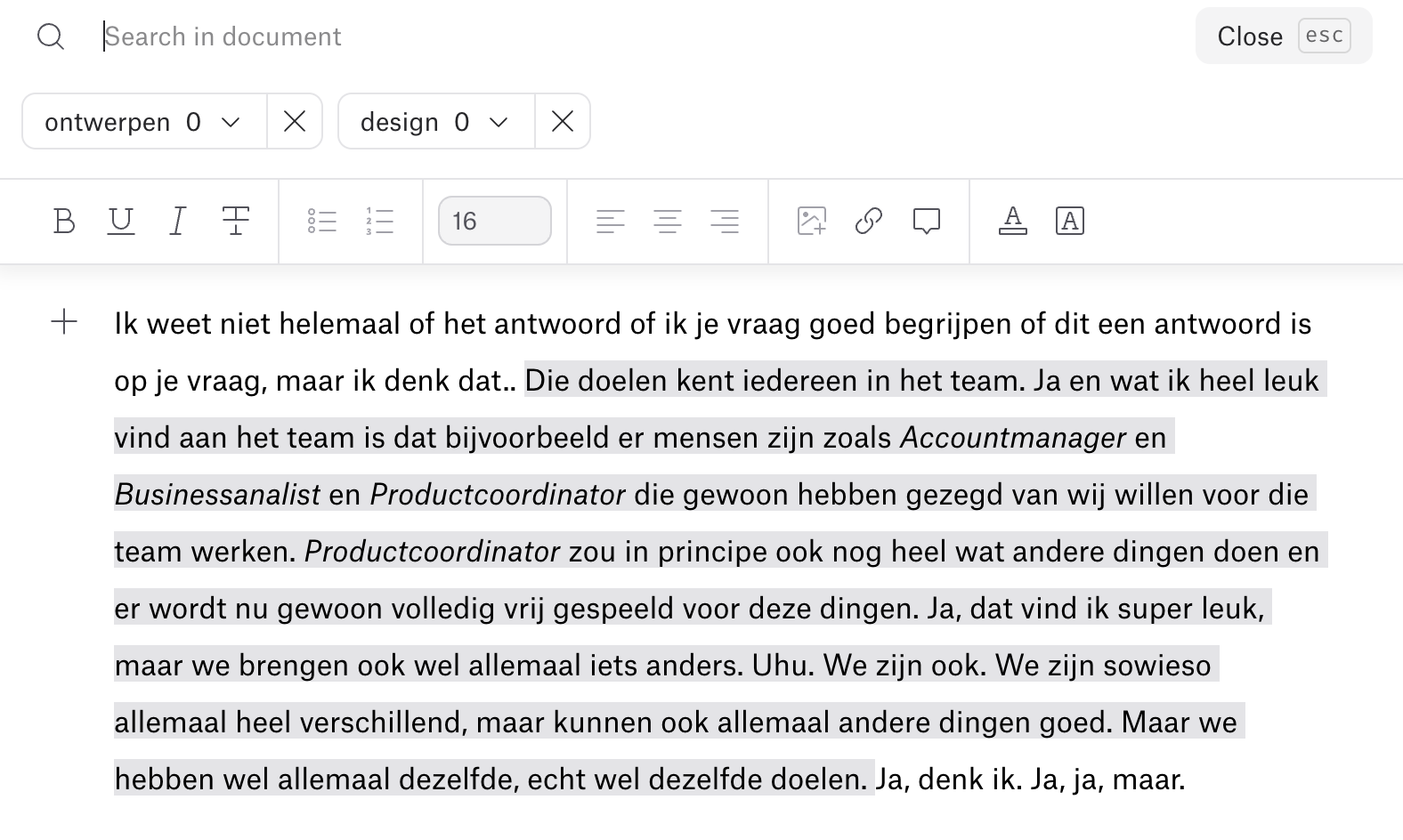
Excerpt from an interview with one of the team members. As you can see, the words “ontwerpen” and “design” don’t come up very often in the interview, but this person does describe how the (design) team comes together with enthusiasm.

The Forgotten Profession: The Lawyer

Interestingly, the ISO definition omits one profession that is indispensable within the government: the lawyer.

When it comes to public services, legislation is rarely absent. Sometimes, the only option is to reinterpret the law or explain it differently. Many design disciplines run into this challenge during implementation (let’s take a moment of silence for all the content editorial teams at municipalities and implementing organizations).

When you do succeed in changing policy and legislation, you significantly expand the scope for creating effective services. This is where the lawyers come in. They should not merely assess the situation but take the lead: regularly researching real-world case studies, outlining alternatives, actively exploring scenarios, and then bringing these into the political process.

Without lawyers who are open to the citizen’s perspective, you can’t design anything new. But with such lawyers, you can do things that were previously unthinkable.

Jasper van Kuijk previously referred to them as “can-do lawyers” in his column in *de Volkskrant*. For lawyers (and anyone interested) who would like to become that kind of lawyer, I recommend Mariette Lokin’s *Wendbaar Wetgeven*.

Directors are also part of the team

User-centered design requires flexibility. For example, it allows you to work iteratively and not know exactly what you’re creating in advance. Or to test with users even before everything has been fine-tuned down to the last detail.

This space is not only operational but also administrative. Especially in a government context, you have to deal with policy, politics, and public accountability. If administrators are not involved in the design and learning process, every step becomes a battle to reach consensus or a risk.

At CRI, I see how things can be done differently: decision-makers are involved from the start, receive ongoing insights, and see how users respond. This allows them to adapt, provide direction, and make adjustments based on facts, not just assumptions. Decision-makers are part of the learning system.

How do you begin?

  • Take another look at your team. Who’s at the table right now? What discipline or perspective are you missing? Think beyond the usual suspects—maybe that lawyer, that supply chain partner, or that policy strategist really should be part of the team.
  • Think of your team as a network. You don’t have to put everything into a single group. Work with ad-hoc teams, bring in partners at the right time, and dare to think in terms of flexible structures.
  • Involve lawyers as designers. Not just to approve something, but to help design alternatives. Look for lawyers who are open to new ideas.
  • Make room for leaders and ask them to make room for the team. Create opportunities for collective reflection and establish an accountability structure that strikes a balance between trust and guidance for the leaders and room for experimentation for the team. Not after the fact, but from the very beginning.

You create a people-centered service with people who complement and challenge one another and design together—even if they don’t call themselves designers.

Continue reading?

I also wrote these blog posts about the principles of human-centered design:
Categories
Human-centered design

Designing means testing—and then testing some more

Government services don’t have to be finished to learn from users. Designing a service for people means testing what you create, over and over again. This blog post is about how you can let users’ knowledge be your primary guide when creating government services—and why that is essential for developing better policies and better implementation.

Want an update in your mailbox every month about my research? Then subscribe to my newsletter.

“We can’t make this public yet”

“But it hasn’t been brought before the House yet.”
“People might start thinking it’s already been decided.”
“What kind of expectations are you creating then?”

I heard this often when I worked at various implementing organizations. Testing with users before something has been formally agreed upon, politically legitimized, or administratively finalized creates tension. Because, in the government’s logic, “the outside” is what counts. And that “outside” is twofold: on the one hand, you want to communicate democratically legitimized decisions; on the other hand, as a service provider, you want to align with what people need in their specific situations. I previously referred to this as the government’s dual “outside.”

Because of that pressure, user testing is often postponed or even canceled. It has to be “official” first. But what if that very delay is what causes us to know less, learn less, and ultimately be less able to make adjustments?

An important principle of human-centered design

The ISO standard for human-centered design makes it clear: A design must be driven and refined through user evaluation. That means: you create something, you show it to the people you’re making it for and who will use it, you learn from it, and you adapt it. Not just once, but continuously.

This principle builds on earlier principles from this blog series:

So testing isn’t just the icing on the cake. It’s the dough you use to bake. “Being driven by” also means that, when making decisions, you constantly ask yourself how users will experience your design. That’s what makes all the difference!

Why does testing feel so uncomfortable in the government?

In the world of politics and administration, you want control and clarity: Has this been coordinated? Do we have the mandate for this? What message are we sending if we show this to the public? What if people don’t like it, and the media picks up on it?

In design thinking, you actually want openness: What works, and what doesn’t? Where do people get stuck? What are we still missing? What do we need next to make it happen?

These two approaches clash, especially when it comes to “putting something out there.” Yet user testing does something quite different from communication: it’s not a press release, not a policy document, not marketing. It’s learning.

And more importantly, thorough testing actually helps bridge the gap to the political and administrative world outside. Because evidence speaks for itself. You know what works. You see what isn’t working. And you can make better-informed decisions, whether they’re small and operational or large and policy-related.

How is that even possible? What I see at CRI

In my research for the “Clustering Rijksincasso” program, I see how it *can* be done.

Take, for example, the creation of the “Vorderingenoverzicht,” a digital service for citizens who make payments to the government. During each development sprint, the service is tested with users, and their feedback informs the next sprint. Not only does this improve the design, but the entire design process is driven by these feedback sessions.

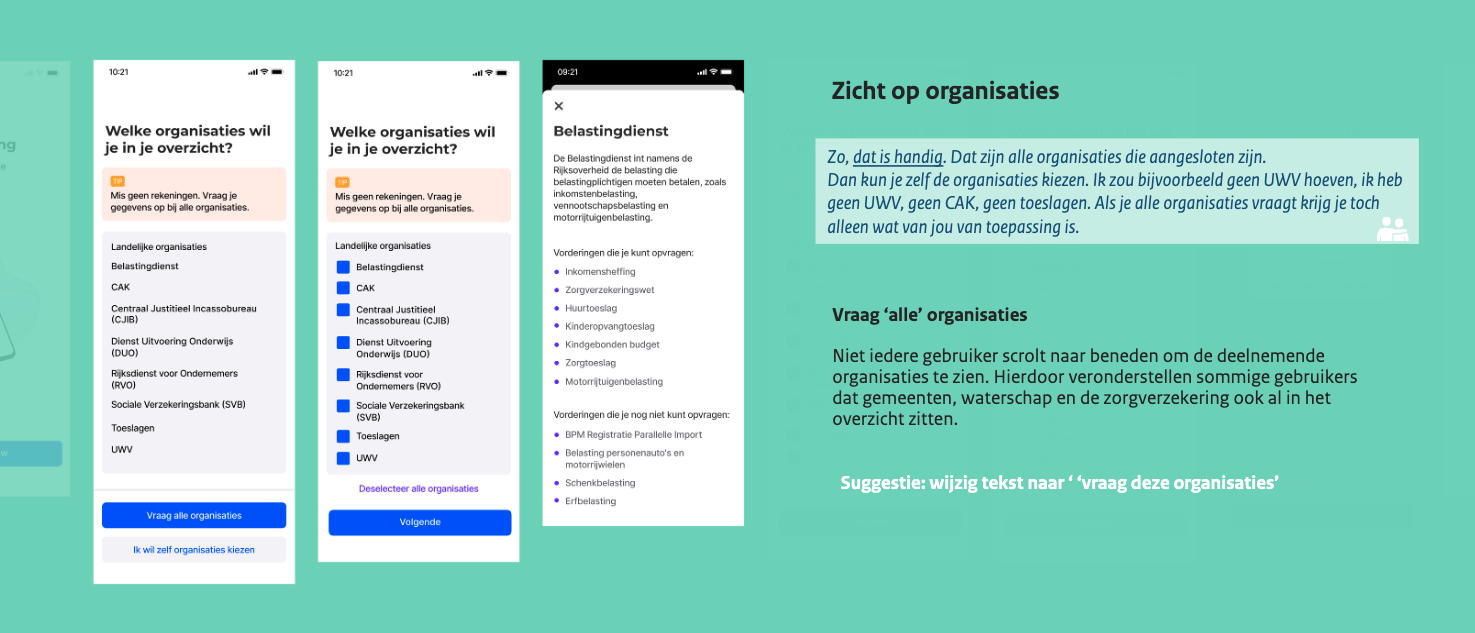
All of their user research is available online and can be reviewed. In handy slides, they consistently showcase what they’ve learned, such as in this example:

Screenshot from the “Testing Flow” slide deck, Sprint 28, by VO Rijk.

Another example is the Central Government Payment Scheme. In the blog post about iterative development, I already explained how this scheme is being expanded step by step to include new organizations. This allows us to learn along the way—both from citizens who use the scheme and from government organizations that join it.

These insights go beyond just text or buttons. They also touch on decisions regarding minimum repayment amounts, how to handle remaining debt, how funds are allocated among organizations, and what is technically and legally possible when it comes to sharing data.

The team operates on multiple levels simultaneously: the service is continuously monitored, in-depth research is conducted periodically with users, and the policy guideline is reviewed annually. In this way, input from the field is utilized both operationally and strategically.

In addition, the team is working on a Government Collection Act, ultimately in collaboration with ministries and government officials—that’s the other side of the story. Here, too, practical experience forms the foundation. In this way, implementation, policy, and legislation converge, based on what works for people.

In short, testing doesn’t eliminate uncertainty. But it makes it visible and manageable. And that’s exactly what you need if you want to create public value.

How do you get started with this principle?

If you want to do this, start small—but make sure you start. Apply the other principles of human-centered design: understand your users’ context, consider their entire experience, involve them throughout the process, and work iteratively.

The ISO also lists activities that can help you with this:

  • Schedule evaluations at various points in your process, not just at the end—by then it will be too late.
  • Choose appropriate evaluation methods (ranging from quick tests to observations and in-depth feedback sessions)
  • Make sure that what you learn is actually reflected in the design. So, update the design regularly, and try out new ideas from time to time so you can test them.

And for leaders: dare to make room for this learning. Create space to change and adjust services, systems, processes, and policies. Yes, it feels vulnerable. Yes, it sometimes rubs against formal procedures. But only by testing can you know whether what you’re creating actually works for the people you’re creating it for.

Categories
Human-centered design Promoklip

Iterative making

You cannot achieve the best human-centered design for an interactive service without iterations. In a series of blogs, I cover the principles of human-centered work. Iterative work is an important part of that. That’s what this blog is about.

Want an update in your mailbox every month about my research? Then subscribe to my newsletter.

Getting it right in 1x

The other day I was at a meeting where two approaches were pitched on the whiteboard after a work session. One was a sort of intermediate step where a few things were temporarily taken care of. The other was the creation of a new law where issues could be thoroughly addressed properly. Both options had advantages and disadvantages. At one point, one attendee said, “We’d rather do it right the first time.”

I hear that more often in government. It doesn’t feel efficient to do things if we change it later. And it’s scary. The risk of something not being right and us as a government making mistakes (and getting in the newspaper!) is high.

Many implementing organizations have been involved in major service scandals in recent years, such as with the child care benefit, the WIA benefit or the student out-of-pocket grant. These issues have many different causes and consequences, but what they have in common is that they make organizations insecure about making new mistakes. This makes them reluctant to be creative and experiment. While that is exactly what is needed to make good services.

There are undoubtedly things in daily life that you can get right in 1x, but making services that people can use well, you can’t get that right in 1x. You have to learn, test and fine tune that as you go along. The ISO standard for human-centered design states that by repeating steps and seeking feedback in between, it is easier to achieve a desired result. By working iteratively, you can eliminate uncertainty during the conception and creation of services.

What is iterative work

Iterations literally means repetitions. When you create something, you do it in different versions. As soon as you have new information, you adapt policies, processes, systems, applications and letters again. In doing so, you reduce the risk that what you come up with will not meet the requirements of users and the societal goals at hand.

The complexity of how people interact with your service makes it impossible to fully know all the details at the start of your project. Many of the needs and expectations of users, as well as other stakeholders, only emerge during the course of the project.

It’s an interaction: as creators of services get better and better at understanding what their users need, they can devise and create something that hopefully fits that. Users can then provide feedback on that, upon which creators can adjust the services again.

Each iteration gives a better and better view of your direction and goal. Photo by Joel Fulgencio via Unsplash.

Is this just agile working, or is it not?

Yes and no.

Most government organizations now work agile when creating applications. But working agile does not yet mean that they also work in a people-oriented way and make feedback from users leading in change.

In addition, making services consists of more than technology. It is incredibly valuable that ICT systems are no longer built in the classic waterfall way and are set up in a much more flexible way. The same should be true for how we make policy, for implementing organizational processes, for sharing data between organizations and more.

By themselves, many officials are quite used to creating different versions and incorporating feedback from colleagues. Policy papers go around mailboxes and grow from version 0.1 to 0.9. But once something has version 1.0, the memo has been to the Stas, a law is in the Government Gazette, then it is – sort of – finished. If you notice at a later stage that things should have been done differently, just take a few steps back. That’s why you have to develop policy and implementation iteratively at the same time, so that one can give input to the other and vice versa.

It is precisely iterative practice in practice that provides many valuable insights. I follow an example of how to do that in my doctoral research with the Clustering National Debt Collection program.

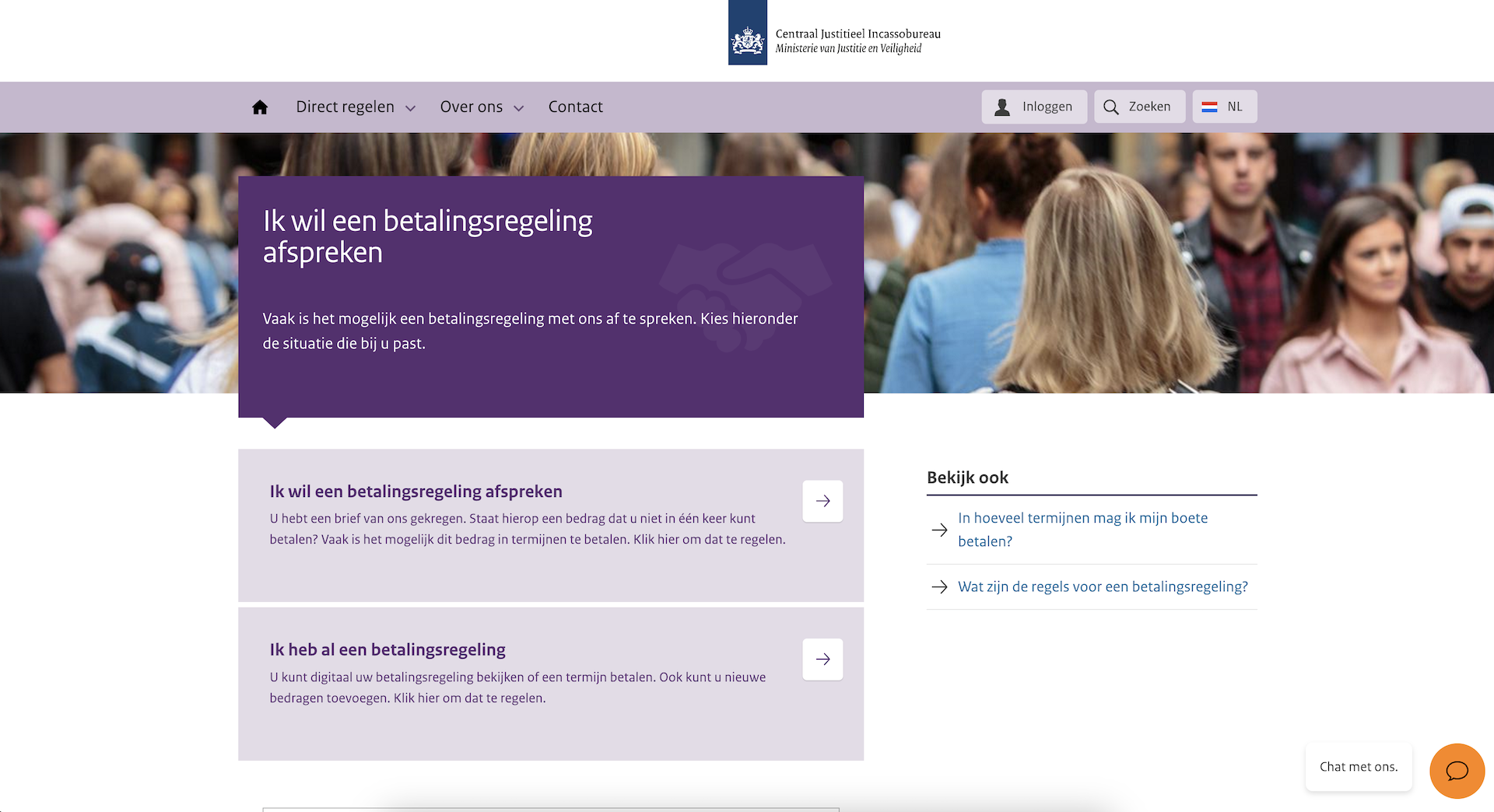
When someone has debts with several government organizations, they can agree on one payment arrangement with the CJIB. At the back end, CJIB controls which organization receives which amount. Two years ago this payment arrangement started with a small group of claims from DUO, CJIB and CAK. Since then, a few more organizations or types of claims have been added each year.

A screen print of the CJIB website where you can make a payment arrangement. Created on March 19.

While it is unfortunate that not everyone in the Netherlands can apply for the scheme for every type of debt right away, CJIB can now learn in practice how the scheme works and what it takes on the back end to redesign the way the government collects debt. In this way, they are learning in practice how best to bundle policies and how to increasingly expand this to include more claims from other organizations. They do usage research on people currently using the scheme and learn why people do or do not persist with a scheme. They use those insights to adjust the policy and implementation of the scheme again. The experiences from the current scheme are also used in conversations with other organizations about how they can connect. In this way, the service continues to grow iteratively.

Iterative making or iterative talking?

Look, per se, in government we have quite a talent for iterative work. But working iteratively without making it gets bogged down in iterative talking. Constantly bringing things up for discussion, from different points of view, it sometimes seems like projects don’t move forward.

So many memos. Photo by Sear Greyson via Unsplash.

That is also iterative work, but not what I mean in this blog. In fact, getting real-world input and testing your idea or design with people who will use it will help move your project forward.

The best way to do that is to make things tangible. How to do that, I’ll tell you soon in an upcoming blog.

I also do my research iteratively, together with you

It is now second nature to me to work iteratively. This is also how I approach my doctoral research. Sometimes it makes me insecure: can’t I think of anything myself? I regularly have versions of articles read by others. My supervisors at the university, as well as readers of my monthly newsletter, regularly comment on preliminary insights and/or read along. Therefore, it also means working openly and transparently.

It is exciting to show something to another person that is not yet finished. You tend to immediately add a hundred things you want to improve, and to cover yourself, but what for? My experience, both with my current research and before when I did user research for DUO and the Corona app, is that people like to give feedback, to help test and help get the job done together.

How do you begin?

Start with the problem and not the solution. When it is shouted in the House of Representatives that “Organization X should also have an app,” yes, you can’t really do anything else. Therefore, start not with a product or concrete solution but with understanding the problem and start from the whole experience of your target group and not just your own organization. Engage users and then consider together what outcome you would like.

For example: it is a problem that many people in the Netherlands are in debt and cannot get out of it themselves. The government itself also plays a role in this as a creditor. How can we as a government solve this problem by collecting debt socially? The outcome: fewer people in (problematic) debt through better services! What kind of service… We design that iteratively together with users.

And: work openly! Share your work, actively seek input from stakeholders including your users. Open working is exciting for government. I previously wrote this guide on how to do this practically.

Categories
Human-centered design Promoklip

Understand users, tasks and environments

How can you make government services that are good for people? To explore this, I look at the principles of human-centered design. In a series of blogs, I’ll cover them one by one. That way, I’ll start to understand them better and better myself.

In this blog, the second principle: design is based on an explicit understanding of users, tasks and environments. What is it, how do you do it and how do you start? Read the first principle back here.

Want an update in your mailbox every month about my research? Then subscribe to my newsletter.

Elephant trails

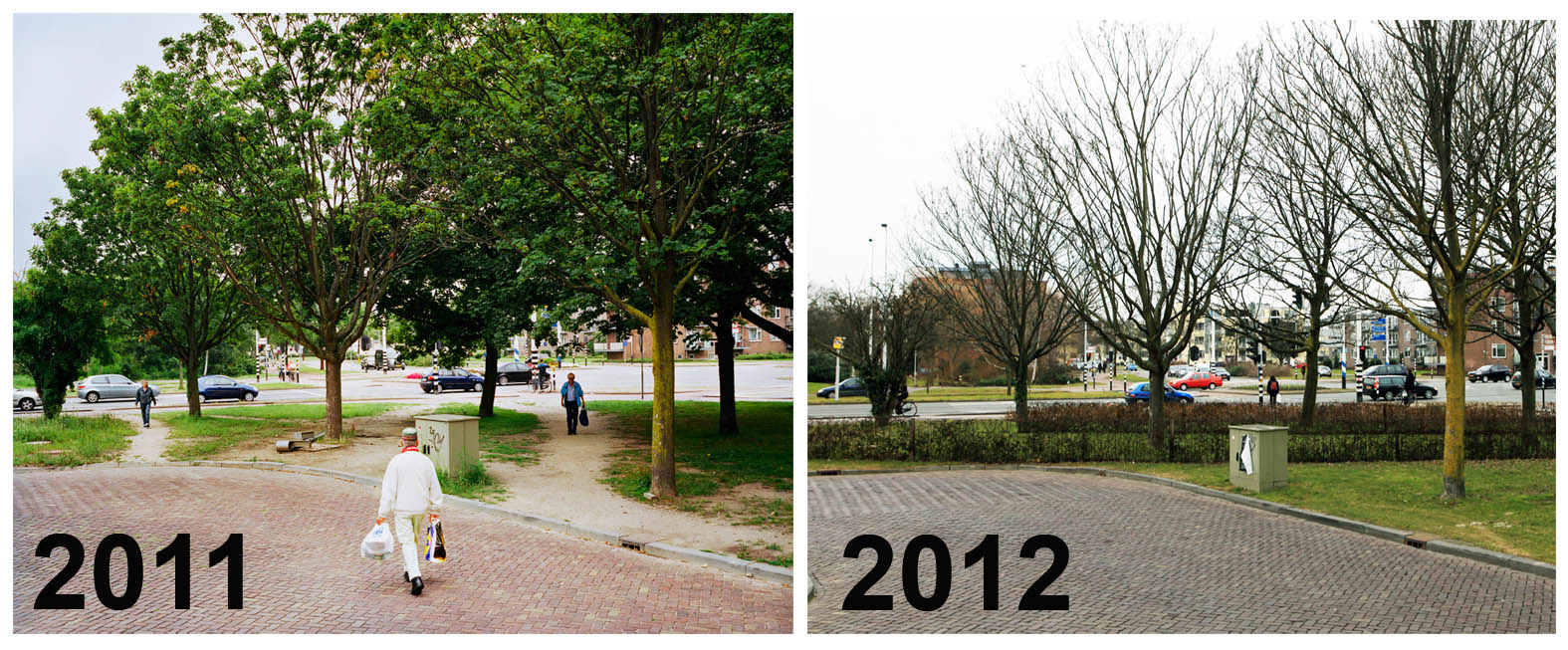
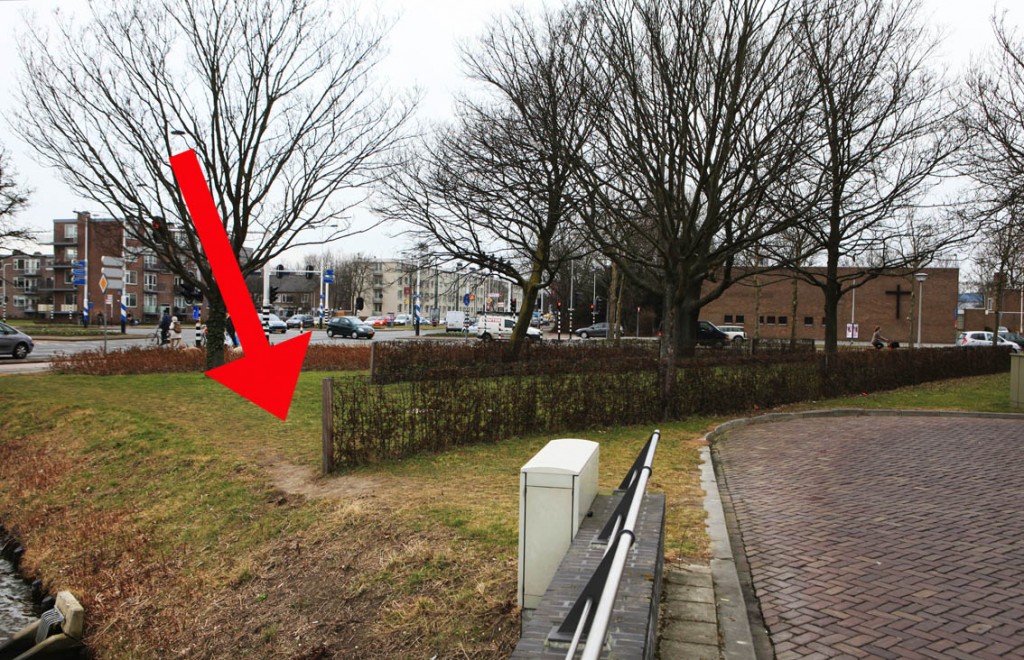
The first time someone explained “usage” to me was accompanied by the example of elephant trails. You know them. You may use them yourself or have even made one at some point. The municipality has built a neat sidewalk, but the most convenient route is just along here, between the bushes. And there you go, off the designed path.

Jan-Dirk van der Burg made a wonderful book about it. On his website he shows how a number of elephant paths are still being hard fought by municipalities, such as in Leiden:

Photo by Jan-Dirk van der Burg of Olifantenpaadjes.nl

Van der Burg writes: “In Leiden, there is an innovative experiment with three parallel hedges, it looks a bit like a military course. The municipality only made a rookie mistake. The hedge just doesn’t connect to the pond area, so then another…”

Photo by Jan-Dirk van der Burg of Olifantenpaadjes.nl

You see: designing something is perfectly possible without considering its use.

But if you want to design human-centered , you can’t avoid looking into how people want to use something and in what context the use takes place. This is true in public spaces, but equally true with products such as electric toothbrushes or government services such as using WIA benefits.

What is usability?

This is the extent to which a system, product or service can be used by certain users to achieve certain goals with effectiveness, efficiency and satisfaction in a given context of use.

Definition usability from ISO standard 9241-210.

When designing products, systems and services, you must consider the people who will use them, as well as people who may be indirectly affected by their use. It is therefore important to first know who these people are. Building systems without understanding who will use it is one of the main causes of system failure. Thus the ISO standard human-centered design for interactive systems.

Whether products or services are useful depends on the context in which they are used. People may have different goals when performing actions with your product or service. In the blog on the principle of “Starting from the whole user experience,” I showed how his-goals, do-goals and tasks relate to each other.

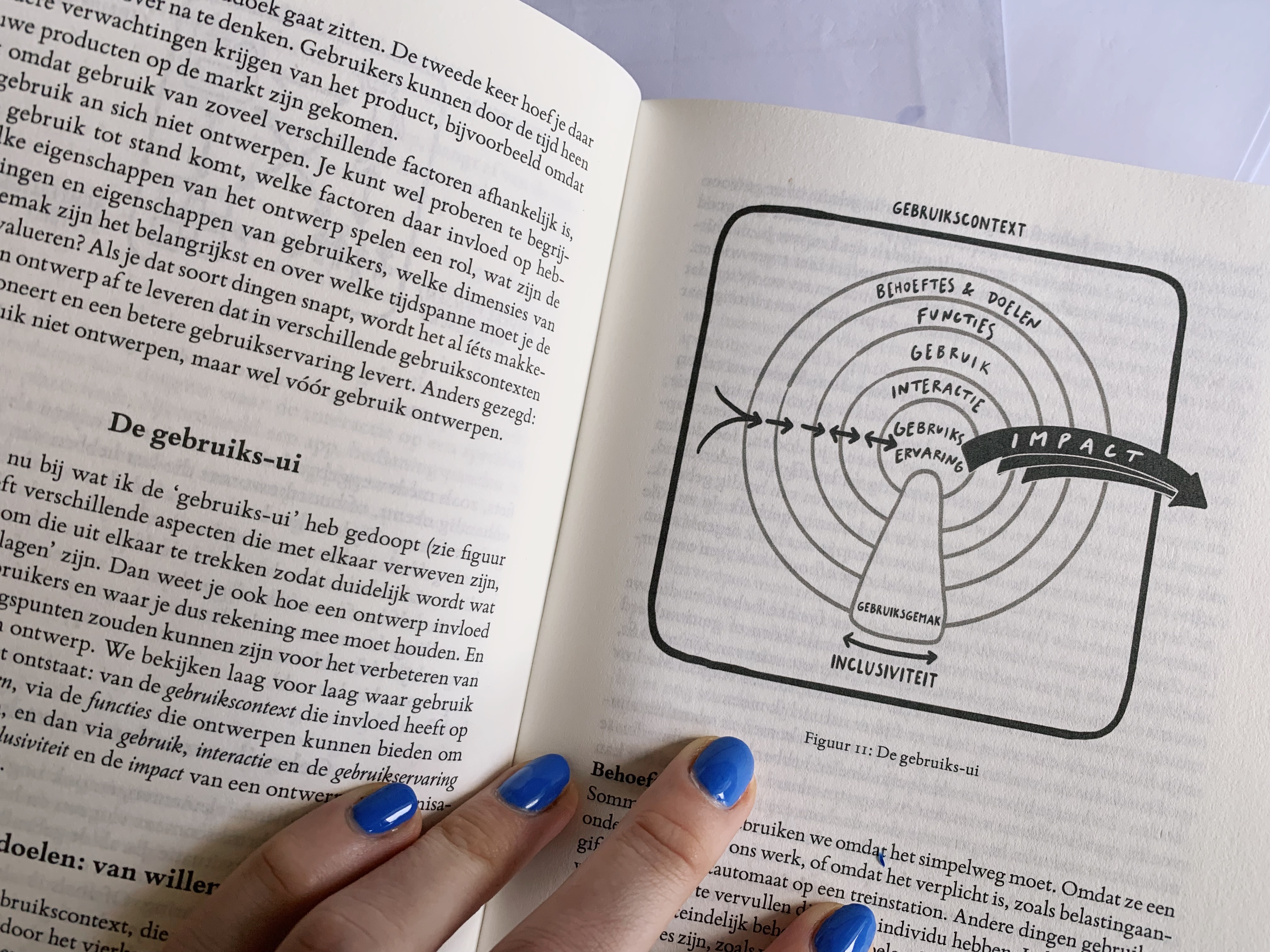
I find that in practice, when people think of usability (or the English “usability”) they often think that buttons should work conveniently on a Web site. But it is much more than that. In his book ‘How easy can you make it’ Jasper van Kuijk explains this with ‘the usabilityui’. Use of a product or service has several aspects that affect each other.

Jasper van Kuijk’s usui from How easy can you make it (2024).

Van Kuijk argues that needs and goals combined with features what a product or service can do makes you use something. Interacting with a product or service allows you to achieve your goal. Next, the user experience is what it does to you while you are using it.

‘Unintended’ additional interactions

An example: in December, my husband and I decided to end our joint business. As real salaried millennials but with creative side hustles, we were also getting a bit older and the side hustles have actually not been around for a while. I went to the site of the Chamber of Commerce, through the drop-down menu to form 17 to deregister a limited liability company. The form needs to be printed, so I to the copy shop in my neighborhood. Then to the Hema for an envelope and then to find out that, yes, on New Year’s Eve the mailboxes are of course sealed, so the whole thing has to be mailed a few days later.

My goal was to write out the vof. A digital function was missing; it had to be on paper. I suspect because of the double “wet” signature. Or perhaps more simply, that digitizing this process is still in the planning stages. However, it significantly affected my user experience. With this, my visit to the Copyshop and to 2 Post-NL points became part of “the customer journey” of the CoC. There was no elephant path, indeed there was a significant detour.

Next, van Kuijk contrasts ease of use with this. This is not a separate layer of usability, but a cross-section of all the above elements. If user experience is what it did to me (emotion), then ease of use is what I could do with it at all (accessibility). Let’s face it: for Henk, my dad, signing out on paper would have been a piece of cake. He has a printer next to his desk with no dried ink and a tray with several sizes of envelopes. And who doesn’t usually start figuring out how to get the job done 1 day before the deadline either. But yes, his daughter unfortunately does.

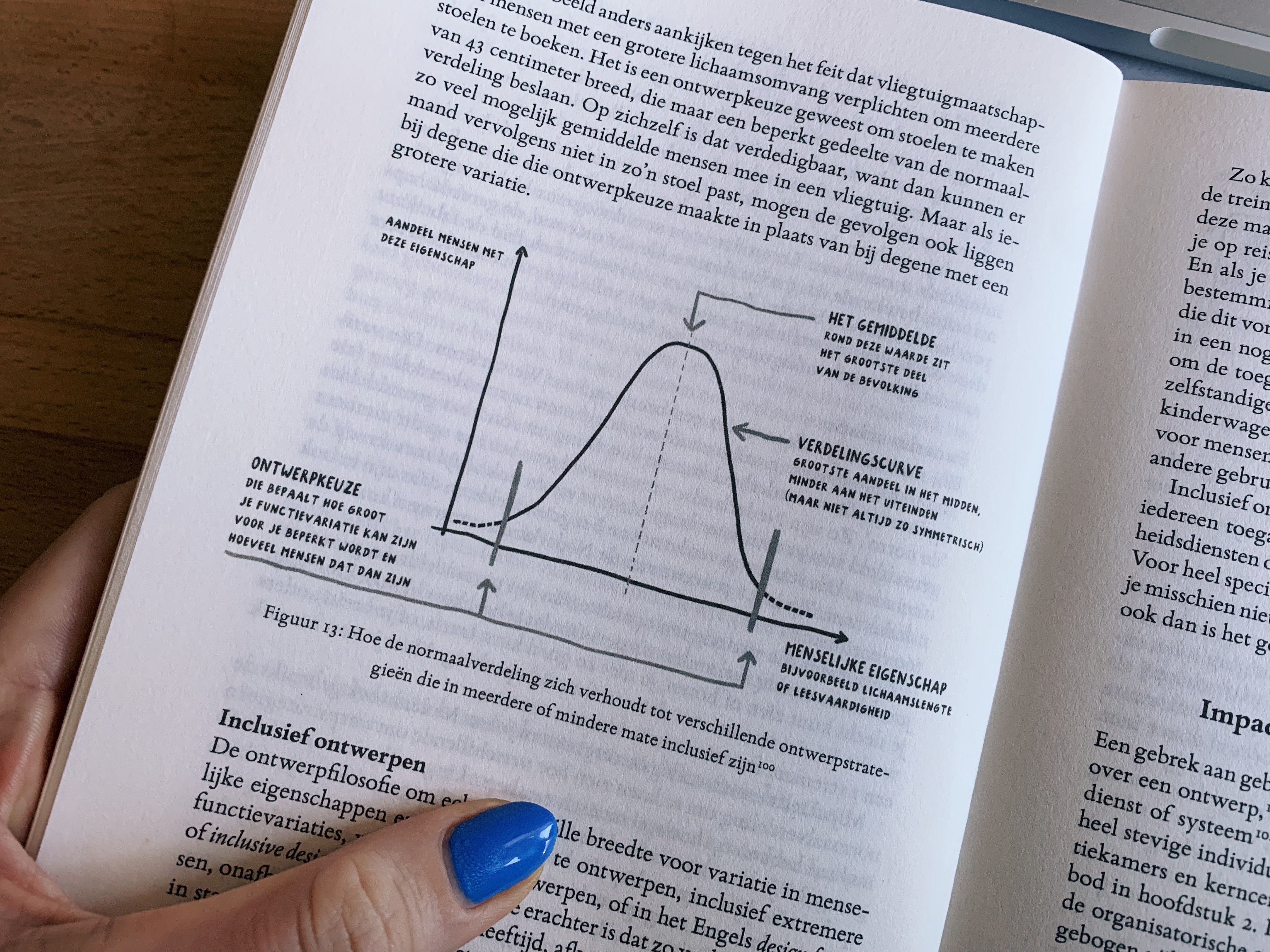
A design strategy may be to serve the largest group, which is what many commercial companies do. Are there more potential Henks in the target group? Those don’t mind making a print, even make an extra one for their own records. Or are there more Maikes in the target group, then you lose sales if you don’t offer your services differently.

Or as Van Kuijk draws it beautifully in his book with a normal distribution:

Job variation relative to your target distribution. From: How easy can you make it by Jasper van Kuijk (2024).

But different rules apply to the government: they cannot choose who they do and do not serve. They have both Henk and Maike in their target audience. The government has to make services for everyone. I could only achieve my goal with this one organization.

The same principles apply to a variety of other products and services. An extra sink at the McDonalds at kid’s height. An e-reader (without blue light) for when you’re still reading in bed at night. Being able to pay a government fine directly with a QR code. A coffee mug with a handy push button that doesn’t leak when you slam it into your bag. Tikkies! Komoot that reads the route flawlessly and on time, while you are running in the woods and you can foolishly follow the voice. Just some products and services that fit exactly with use in context.

How do they do this?

How do the organizations behind these products and services manage to design them so that not only can people achieve their goals with them, but they are also so tasty to use?

They research how and in what context their product is used. For example, one of my favorite running apps was created by people who are avid runners themselves. They understand me and what I need. But even if you don’t match your user, you can research what someone needs and in what context they use your product or service.

For example, by:

  • Target your audience in their own environment. If you make services for students, walk into a university cafeteria and strike up a conversation. Are you working on services for people in debt? Take the time to hear the stories people are dealing with. Visit people in their own environment instead of hosting sessions in the office. It is precisely in their own environment that you understand how things impact each other. Observe how people use your service. Ask for examples and if they want to show you something, not just tell you about it.
  • Then engage in structured work to map usage information. Do focused in-depth interviews and observe several people while using existing services. Determine what their specific needs are. Fill in Van Kuijk’s usui based on your research. Let this guide the decisions you make during design.

These are also called the first two activities of human-centered design from the ISO standard.

Continue reading?

  • What is human-centered design? All the principles and activities based on the ISO standard at a glance.
  • The usui comes from: J. Van Kuijk (2024), How easy can you make it? Atlas contact.
  • Jan-Dirk van den Burg, 2011. Elephant trails. A series on the tension between planning mishaps and human instinct.
Categories
Human-centered design Promoklip

What is human-centered design?

Next week at the CRI program, where I am doing my practical research this year, I am giving a human-centered design workshop. For the past six months, I’ve been walking through consultations, interviewing colleagues and working on a sub-project myself. This summer I analyzed all the data so far, and starting this summer I will share the insights with the team. Part of that is reflecting about how to apply principles and activities of human-centered design.

This blog is in preparation for that reflection workshop. I was looking for a handy and simple introduction to the subject of human-centered design, which I can of course share with you as well. For my colleagues, I made a nice little clickable blog in which they could put their answers right away, unfortunately you have to make do with static content. There must be a difference of course.

If you want to follow my research, subscribe to my monthly newsletter.

The first entrant

The essence of human-centered design, if you ask me, is still best explained by IDEO, one of the founders of the method (Kelley & Kelley, 2013).

There are many diagrams and pictures that explain the process and principles of human-centered design. Some have 3 steps, others 7. But all have fairly the same cycle. You put yourself in the situation of the person who has a problem, come up with one or more solutions, prototype one so you can test the idea and, again together with the person experiencing the problem, see which solution is the best.

In my research I use the ISO standard human-centered design for interactive systems. I chose this one because it describes the human-centered design process well, and because my research focuses on government services that, for the most part, go through interactive human-computer systems and everything that is involved at the “back end. Think IT systems, organizational processes and public policy.

I used the principles and activities from the ISO standard to compare all observations of the past months and interviews with colleagues. I always looked at what I saw reflected, and which factors helped to work this way and which things did not.

During the workshop, I am especially curious about how colleagues themselves view this.

  1. What do you understand by this principle or activity?
  2. How do you recognize it or not in your way of working?
  3. What do you think works well for you and what doesn’t?
  4. Where do you see room for improvement?

You can also ask these questions in your organization. If anything interesting comes up, I’d love to hear about it!

Principles of human-centered design

In aparte blogs werk ik de komende tijd deze principes die ik in mijn onderzoek gebruik uit:

  1. Wat we maken en bedenken is gebaseerd op een expliciet begrip van gebruikers, taken en hun context.
  2. We betrekken gebruikers continu bij het bedenken en maken van oplossingen
  3. Onze ontwerpen worden geoefend en getest met echte gebruikers, dit bepaalt de keuzes die we maken.
  4. We werken iteratief. 
  5. Onze ontwerpen richt zich op de gehele gebruikservaring van de gehele service.
  6. In ons team zitten mensen met verschillende vaardigheden en perspectieven om samen mensgericht te kunnen ontwerpen.

By the way, a design can be anything. For example, a design for an interactive app in which you can see your debts, or a design for a settlement a citizen can make with the government. Or a design for adapted policies around legal protection.

A design is a potential solution to a problem.

Potentially, because the cool thing about design is that you can try something out. You do that by making an unfinished version of the design (a prototype) that you can test with real users. For example, people in debt, but also colleagues from the helpdesk who are making payment arrangements with a citizen.

If you work from these principles, you should – if all goes well – see that reflected in what you do and what actually happens.

Activities of human-centered design

Human-centered design is an iterative process, a cycle in which the last step restarts the first.

The only step, step 0, that still takes place before that is: planning the human-centered design process. This includes creating preconditions to work this way. The steps after that:

  1. Understand and specify the context of use. This context is both that of the user and all other parties involved in the problem.
  2. Identify the needs of users and other stakeholders. These may include opposing needs.
  3. Creating design solutions. In other words, coming up with solutions to the problem, how they fit the context of the users and what they need, and then developing this into tangible prototypes.
  4. Evaluate the design. You can do this with those tangible prototypes, but also do it over the long term. When solutions are already (partly) implemented, you keep monitoring. You use the feedback to iteratively make it ever more appropriate to the context of use, step 1.

If you would like to read the entire ISO standard human-centered design with all the explanations and definitions, please send me an email.

Resources

ISO. (2019). ISO 9421-210 – Ergonomics of human-system interaction – Part 210: Human-centred design for interactive systems. Geneva, Switzerland, International Organization for Standardization.

ISO. (2023). ISO 9421-221 – Ergonomics of human-system interaction – Part 221: Human-centred design process assessment model. Geneva, Switzerland, International Organization for Standardization.

Kelley, D., & Kelley, T. (2013). Creative confidence: Unleashing the creative potential within us all. Crown Business.